Beef DLL Creation & Research

Beef language is still in heavy development. Anything can change at any time in Beef language and thus this document may not be valid anymore!
Requirements
- Latest BeefIDE (nightly)
- DebugView++
About Beef
Beef is an open source performance-oriented compiled programming language. Basically it's C language with C# like syntax. OOP paradigm also can be used for developing applications since in Beef you can create custom reference types (Objects) and combine it with polymorphism. Reflection is also possible. Its quite fast and its fun to work with. More info can be found here -> https://www.beeflang.org/
Beef DLL and DllMain
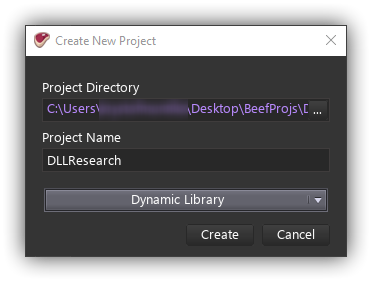
So first we need to create DLL project in Beef IDE. Go to File -> New -> New Project and choose Dynamic Library.
Now we need to add new class called Program. Like this:
namespace DLLResearch {
    public static class Program {
        public static this() {
            Debug.WriteLine("Hello From Beef DLL :3");
        }
        public static ~this() {
            Debug.WriteLine("See ya next time my friend :)");
        }
    }
}
So lets compile it and inject it into some process. I am gonna use notepad. As you can see, when our library gets loaded, we got our first message. So lets try to unload our library and see what happens.

DebugView++ Output: Printed message from static constructor
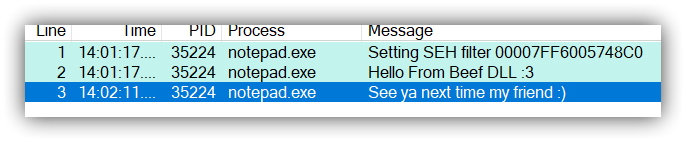
Looks like our destructor gets called.
Note: Our destructor also gets called when process, where our library is loaded, gonna exit.
Exporting methods
So what if we want to export some methods from our DLL? Well... Thats a simple task. Just write your method and use ExportAttribute on it like this:
[Export]
public static int32 MyAmazingMethod(int32 a, int32 b) {
    return a + b;
}
This will export your method using Beef style mangling. Ez ...

Exported method using Beef-style mangling
But what if you want to use your method in some assembly written in C-style? Then you need to add CLink attribute. That will export your method using C-style mangling.
[Export, CLink]
public static int32 MyAmazingMethod(int32 a, int32 b) {
    return a + b;
}
Exported method using C-style mangling
See? It's that easy! In case we need C++ mangling we can use LinkName attribute. You can use this attribute to specify link name for importing method from another DLL or to specify mangling rule for exported method. Actualy you don't need CLink at all. You can use LinkName(.C) or LinkName(.CPP) instead!
[Export, LinkName(.CPP)]
public static int32 MyAmazingMethod(int32 a, int32 b) {
    return a + b;
}
Exported method using C++ style mangling
As you can see, calling convention also can be changed. The default one is cdecl and is used by default. If you want to change that, you need to use CallingConventionAttribute. For example:
[Export, LinkName(.CPP), CallingConvention(.Stdcall)]
public static int32 MyAmazingMethod(int32 a, int32 b) {
    return a + b;
}
Note: That works only when we are targeting x86 platform.
How to work with threads
How to work with threads? How we can start a thread on DLL loading and how we can terminate thread on DLL unloading? We also need to make sure that the process, where our DLL is loaded, will exit gracefully.
Lets add one thread called myThread and initialize it, so it will run our method called ThreadMethod.
using System.Diagnostics;
using System;
using System.Threading;
namespace DLLResearch {
    #AlwaysInclude
    public static class Program {
        public static Thread myThread = new Thread(() => ThreadMethod());
        public static this() {
            myThread.Start();
            Debug.WriteLine("Hello From Beef DLL :3");
        }
        public static bool exit = false;
        public static ~this() {
            Debug.WriteLine("See ya next time my friend :)");
            exit = true;
            myThread.Join(500);
        }
        public static void ThreadMethod() {
            Debug.WriteLine("ThreadMethod started.");
            var i = 0;
            while(!exit) {
                Debug.WriteLine($"Hello from Beef DLL. Counter: {i++}");
                Thread.Sleep(500); // Wait 500 ms
            }
            Debug.WriteLine("ThreadMethod ended.");
        }
    }
}
Compile it and inject your DLL into some process (notepad in my case) and after some time unload it.
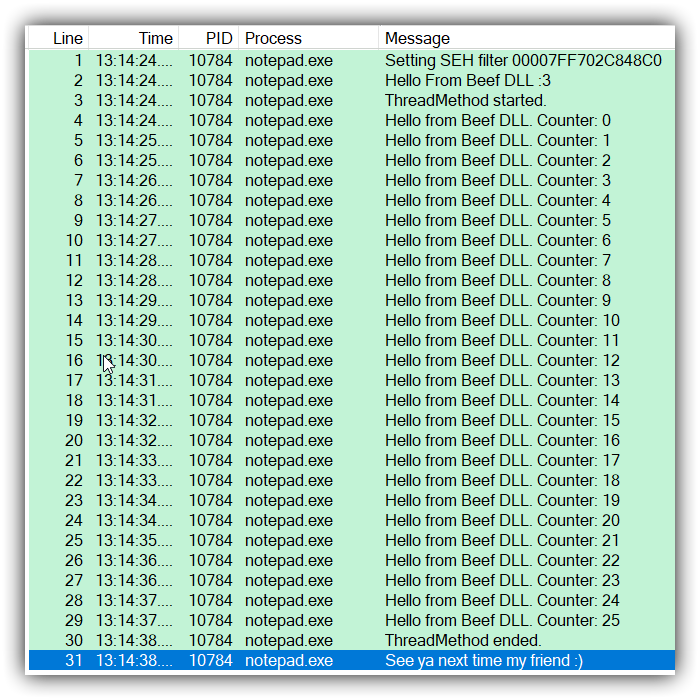
And it works! Working on DLL using Beef is fun and really simple. Next time i am gonna try to create simple game DLL made in Beef.